FetchDomain
A FetchDomain allows sending JavaScript fetch
requests within a certain page.
Note that fetch is sensitive to the CORS policy on a given page; if your request is failing or
missing content, try using the HttpDomain instead.
Usage
A FetchDomain object is initialised with every new Page and bound to it under
Page.fetch_domain. A shortcut is available, too, via Page.fetch().
A basic example using Firefox to navigate to a site and then perform a fetch request.
import asyncio
from mokr import launch

async def main():
    async with launch("firefox") as browser:
        page = await browser.first_page("https://example.com")
        response = await page.fetch("https://example.com")
        # Note that while Firefox response content is empty in regular
        # navigations, it is populated in ad hoc fetch requests.
        content = await response.content()
        print(content)

asyncio.run(main())
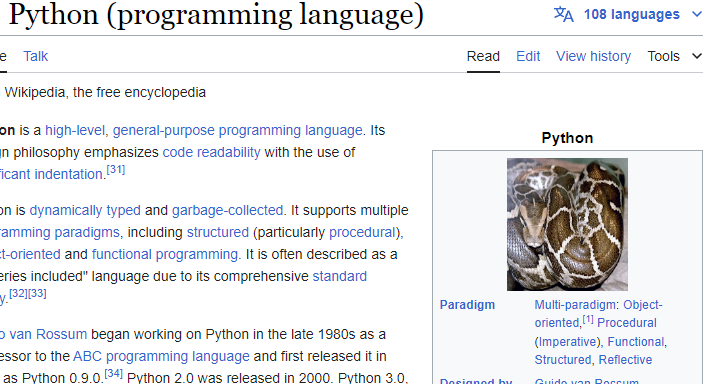
A more complex example using Chrome to intercept a specific image request, use fetch to get a new image, and fulfill the request with it.
import asyncio
from mokr import launch
from mokr.network import Request, Response

async def main():
    snake_url = "https://upload.wikimedia.org/wikipedia/commons/3/32/Python_molurus_molurus_2.jpg"
    async with launch(headless=False) as browser:
        page = await browser.first_page()

        async def intercept_request(request: Request) -> Request | None:
            print(f"Intercepted request for: {request.url}")
            if request.url.endswith("Python-logo-notext.svg.png"):
                print("Getting a cute python picture to use as the new logo...")
                response = await page.fetch(snake_url)
                await request.fulfill(response)
            else:
                return request

        def log_response(response: Response) -> Request:
            print(f"Got {response.status} from: {response.url}")

        page.on("request", intercept_request)
        page.on("response", log_response)
        await page.goto("https://en.wikipedia.org/wiki/Python_(programming_language)")

asyncio.run(main())
Screenshot from running the above example.